
The First Week

Well hello reader! 👋 So let's frame this story line for you. I finally had moved my home lab equipment to its new sauna and I said to myself "Self, we need to put this money pit to good use!". Today I am running a 3 node cluster on Intel NUC 12 Pro minis with Intel i5 and 64GB memory each. 🖥️ I know, you're jealous, I'm pretty cool! Now I did do the initial install and configuration. I even built my first template, started deploying docker swarm hosts and deployed a couple containers. Then I stopped. I said, "Wait... it's 2026, everyone is talking about AI taking our jobs... Can it?". Yes, I talk to myself a lot, it keeps me on track. (An hour later) I just sat back down in front of this and I have no idea where I'm going with this... Oh ya! Deleting everything! So I deleted everything! 🗑️ Then, I set out on a two or three week adventure of research for an agentic coding agent to start deploying my home lab. Now like any good engineer, I tend to fill my spare time with watching other people do things on YouTube that I should be doing. One of my favorite channels is NetworkChuck(1) (If by some miracle you're reading this Chuck, you're great! I love you! Keep going dude! ❤️) and he has had this dude, Daniel Miessler(2) on his channel a couple times. So I went down the rabbit hole and heard something I really needed to hear.
*FYI, my "m" key is broken and sometimes misses keystrokes so if at any point you see "hoe lab"... my bad... also the "s" key is doing the same thing 😅 *

Okay wait... I'm going to get majorly sidetracked. I'll do a separate blog post about feelings and fears... feelings... yuck! 🫠 The gist of the story is, Daniel believes that we as humanity need to define ourselves by our values, goals, unique contribution and that AI needs to understand those things to help us drive towards our goals. Okay... move on... BUT... I have so much to say about this... RABBIT HOLE!!!! 🐇
OMG! I'm back! I had to just go do something real quick to refocus! You ever just need to get a drink of water? 💧 Anyways, so I basically found my people and my AI agent. I went with Claude Code. Now I don't know that I will always use Claude Code and in fact I don't just use Claude. In week three we'll talk about that in more depth. So the next thing I did was install Ubuntu headless server. I know, Claude Code has a very nice desktop app and a very nice GUI but... I'm just not a fan of GUIs. Plus around this time I had also turned my brother onto Claude. I was playing around with the GUI and just blown away by what I was getting back and its ability to understand what I wanted and start writing code. And this was just the chat! So I wanted an environment that 1. I could share with my brother and 2. I wanted something I could turn off if I feel the need (See, I don't wholly trust AI just yet 👀). Then I created the folder "the-great-experiment". So what's the first thing I do, spin up a template of course! We are about to build out tier 0 infrastructure, I need a template for all the VMs I'm about to deploy!
Actually no, the first thing I did was create a markdown file. This was called "The Vision.md". 📄 In this file I wrote down everything I wanted to do. Everything I wanted to provide my family. I explained the organizational structure of agents I thought might be useful and skills they should have. I included some information about my network and the different VLANs I have and what they are used for.
Then my friends, I ran the command, the command that begins, the command that there is no coming back from (I guess unless you delete the folder), I ran... /init! 🚀 Something wonderful happens when you first run that command. All of a sudden, your agent has context about you, what you want to achieve, and even ideas on how to get there. Now of course I knew what I wanted and where to start so I did it... Because I'm the Captain of this ship! 🏴☠️
I started writing my prompt, and I'm sorry but I didn't save it because at this point I was still arguing with myself about whether or not to start a blog in 2026, it seemed at the time like a futile action. I started with what I knew, Terraform. My thought process was "If this is an epic fail at least I'll have what I need to get back up and running". I also decided to go with the Ubuntu Cloud-init image. This gives me the false sense of security because the OS is "immutable" (it's not really immutable... I'm not sure where that notion came from 🤷). Now, I could post the terraform script here so you could see... I guess. But look, I looked at it one time, when I saw it in my terminal and that's it! It still uses that script when I deploy VMs but, why do I need to look at it? And doesn't me posting it here kind of defeat the purpose of this experiment? The point is, I don't want to be managing this stuff all the time. The fact is, paying someone to write terraform scripts and manage those things and keep them up to date is well... A waste of money! 💸 And guess what! Managers and above think so too! They would much rather be paying good, well compensated (notice managers I just said "well compensated") engineers to be doing things of value! Not writing and maintaining Terraform scripts.
So after the first week was over, I had deployed 3 Ubuntu servers with docker swarm, Portainer, Postgres, Traefik, Authentik (Yes, I have SSO in my home lab! 🔐), Adminer, What's Up Docker, Dozzle, Ntfy, plugged my existing pi-hole DNS servers in, and had integrations into my Unifi networking. Now, I know I just told you what I had done over a week but, those deployments actually happened over a weekend... 2 DAYS! ⚡ So why did I say a week? Well friends, AI is forgetful... In fact it is very forgetful, we will dive into how I have started to solve for this in next week's blog but here is how I started. In the past I have worked for entities that required everything... and I mean everything to be documented. That was how I started in IT, I was doing Windows XP to Windows Vista migrations and every single desktop had to be touched and every single touch had to be documented. This continued into my data center days where every app and server and backup I was in charge of had to be documented. And those processes have stuck with me through my career. Now, I am not a documentation Nazi but (In fact I hate writing documentation), I can't tell you how many jobs after that I have had where at least some documentation would have been nice.
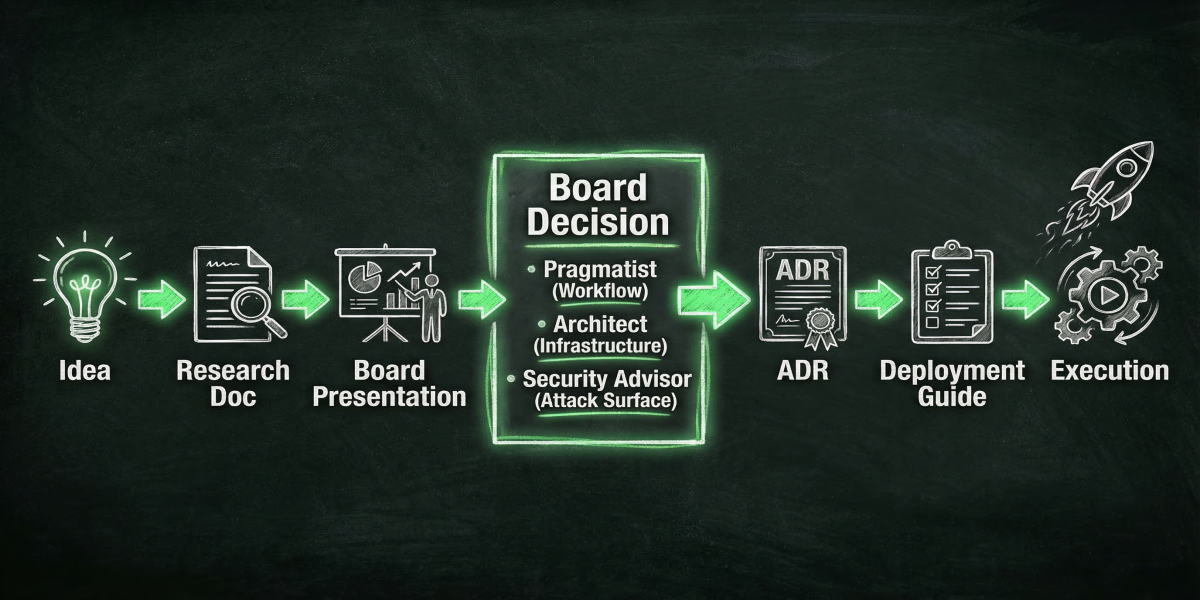
So I spent the days before deployment building documentation. 📝 Remember earlier I talked about The Vision document? So as part of the vision document I have roles like the Pragmatist (Workflow), the Architect (Infrastructure), the Security Advisor (Attack Surface). They are essentially my change management board. But let's back the CAB donkey up a little — before I even get to deciding what should happen, I need research. So I set out to research all the things I wanted. Things like competitive technologies, security, whether the code is still being maintained, user satisfaction, and compatibility with the things I knew I was going to run. The research documents then feed into a presentation the agent has to give to the board. The board members then make a decision on which product to go forward with. That then gets built into an ADR (Architectural Decision Record) which details how the app will get deployed into the environment, dependencies, and order of operations. Then finally we build a deployment guide. And this is where everything that needs to actually happen to deploy an app is written down. That ENTIRE process, is done by Claude Code and its built in agents. I didn't have to build a single agent at this point! 🤯
I know what you're thinking, "That's great Blackbeard but how do you read it"? I built my own document repository! 🏗️ Now I could have used something open source and had it upload those documents to it but... why? I am paying for Claude Code, why not use it?! It's pretty simple actually, it's just a python web service running scripts to convert the markdown files Claude Code writes into HTML and then I host it from my Claude server. And because it's mine, I get to customize it! So I did! And it has a fun Cyber Punk vibe now! 🤖 Here's a little screenshot for you:
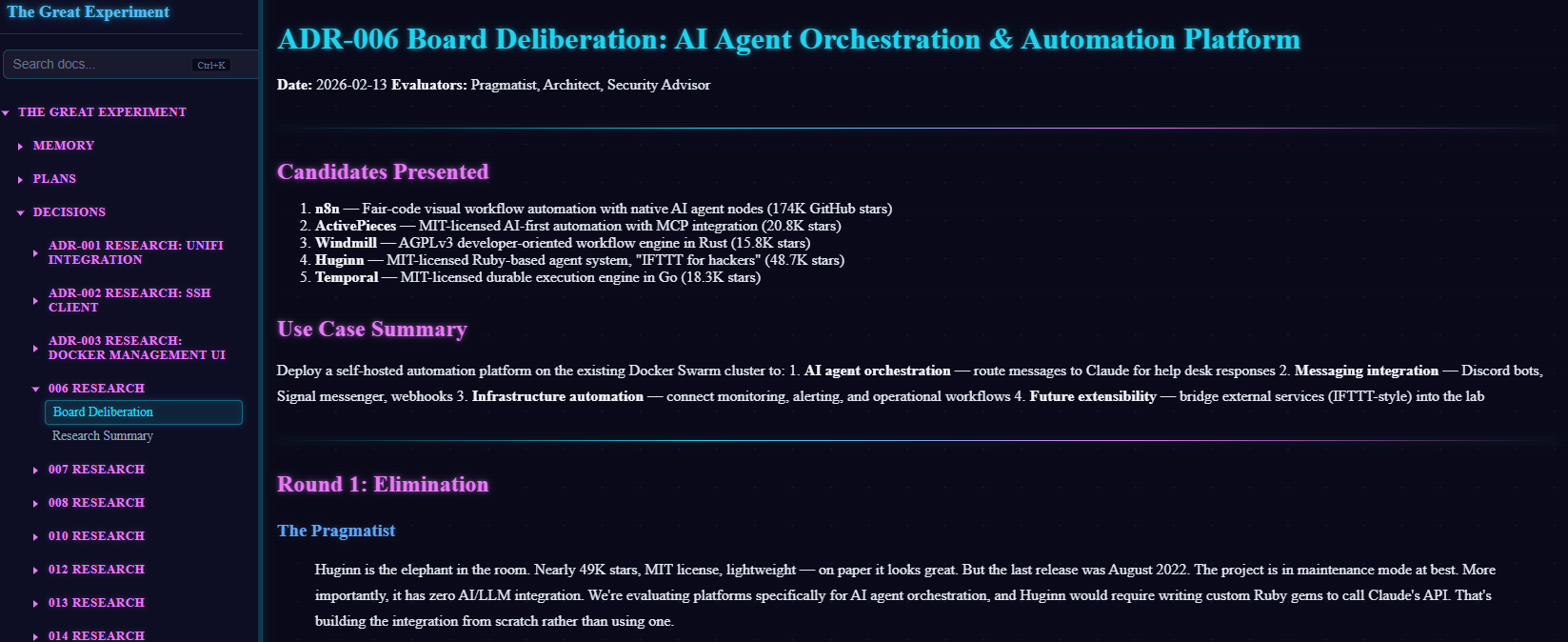
Just for you Matt 😘
So in conclusion, the first weekend of deploying open source or community edition software went without a hitch (though the following week we had a complete database meltdown 💀). It went really really well and I was very happy with the outcome. Now you might be wondering how did I learn to do that? How did I know that having documentation would help make the process work so well. To my brothers and sisters in the trenches of IT, AI is just a tool! 🔧 And like all tools it has its limitations and shortfalls. You just need to know that and work with it. I know, no one likes writing documentation but again, no one wants to pay a highly skilled engineer or architect to sit around all day writing documentation! So don't! Let the AI do it for you, you review and make sure it's accurate, and then pass it off as your own! Because it is! I'm not at all saying you should deploy AI in a business and just give it the keys to the kingdom like I have done. This is my home lab and if it blows up tomorrow I'll be sad but guess what, I'll just rebuild. The only people it really affects at the end of the day is me. So, is AI going to take your job? Not today, it needs too much help. The headlines of autonomous AI are just marketing bullshit right now. But if you learn today how to make it work for you, you become the AI expert in your business and become the innovator! 🚀 Okay, that's it! Drop a comment on your thoughts or tell me I'm wrong! If you want to do what I have done here, drop this blog post into your AI of choice and tell it to build a plan around this. In fact, here, I'll do it for you! Did ChatGPT just call my blog post CHAOS?!?!
[!NOTE] Output from ChatGPT
Here’s a clean, structured deployment plan based on the blog—no code, just process, phases, and decision flow. I’ve translated the chaos into something you could actually execute (or hand to your AI agent to execute).
🏴☠️ AI-Driven Homelab Deployment Plan
Objective:
Build a self-deploying, AI-assisted homelab platform using infrastructure-as-code, strong documentation, and agent-driven decision making.
1. Guiding Principles
1.1 Core Philosophy
-
AI is a tool, not an operator
-
Humans define:
-
Vision
-
Constraints
-
Approval
-
-
AI handles:
-
Research
-
Documentation
-
Implementation drafts
-
1.2 Design Goals
-
Reproducibility (burn it down, rebuild fast)
-
Low manual management
-
Documentation-first architecture
-
Modular services
-
सुरक्षित-by-design (security baked in early) <-- lol, what is this?! See, AI still needs help!
2. Environment Baseline
2.1 Hardware Layer
-
3-node cluster (NUC-style)
-
Shared compute model
-
Sufficient RAM for container workloads
2.2 Virtualization Layer
- Existing hypervisor platform
2.3 Network Integration
-
VLAN segmentation (pre-existing)
-
Integration with UniFi networking
-
External DNS via Pi-hole
3. Phase 1 – Vision & Context Initialization
3.1 Create “Vision Document”
This is the single most important artifact.
Contents:
-
Goals (family services, automation, learning, etc.)
-
Desired capabilities (SSO, monitoring, notifications, etc.)
-
Network layout (VLANs, services per segment)
-
Security expectations
-
AI agent roles (see below)
3.2 Define AI Governance Roles
Create a virtual “Change Advisory Board”:
-
Architect
- Infrastructure decisions
-
Pragmatist
- Workflow & usability
-
Security Advisor
- Risk & exposure analysis
These roles:
-
Review proposals
-
Approve/reject technologies
-
Drive consistency
4. Phase 2 – AI Agent Initialization
4.1 Initialize Agent Workspace
-
Create project directory (e.g., the-great-experiment)
-
Load Vision document into context
-
Initialize AI agent (Claude Code or equivalent)
4.2 Establish Interaction Model
-
You = decision authority
-
AI = researcher + builder
-
All actions must trace back to documentation
5. Phase 3 – Documentation Pipeline (Critical)
This is the engine that makes everything work.
5.1 Required Document Types
For every service:
-
Research Document
-
Alternatives
-
Community health
-
Security posture
-
Compatibility
-
-
Presentation
-
AI summarizes findings
-
“Pitch” to the board
-
-
Decision Output
- Board selects solution
-
ADR (Architectural Decision Record)
-
Why chosen
-
Dependencies
-
Tradeoffs
-
-
Deployment Guide
-
Step-by-step deployment logic
-
Order of operations
-
5.2 Workflow Pipeline
Idea → Research → Presentation → Board Decision → ADR → Deployment Guide → Execution
6. Phase 4 – Infrastructure Foundation
6.1 VM Deployment Strategy
-
Use Terraform (AI-generated)
-
Use Ubuntu Cloud Images
-
Use Cloud-init for:
-
Base config
-
SSH
-
Docker install
-
6.2 Template Strategy
-
Create golden VM template
-
Standardize:
-
OS
-
Security baseline
-
Networking config
-
7. Phase 5 – Core Platform Deployment (Tier 0)
Deploy foundational services in this order:
7.1 Container Platform
- Docker Swarm cluster
7.2 Core Services
-
Reverse proxy (Traefik)
-
Container management (Portainer)
7.3 Identity & Security
- SSO provider (Authentik)
7.4 Data Layer
- PostgreSQL
7.5 Utility Services
-
Adminer (DB management)
-
Dozzle (logs)
-
What's Up Docker (updates)
-
Ntfy (notifications)
7.6 External Integrations
-
Pi-hole DNS
-
UniFi networking integration
8. Phase 6 – Documentation Hosting System
8.1 Build Internal Doc Portal
-
Convert markdown → HTML
-
Host via lightweight web service
-
Centralize all:
-
Research
-
ADRs
-
Deployment guides
-
8.2 Design Goals
-
Readable
-
Searchable
-
Customizable (your “cyberpunk vibe” 😎)
9. Phase 7 – Deployment Execution Model
9.1 AI-Driven Execution
-
AI reads Deployment Guide
-
AI generates:
-
Terraform configs
-
Config files
-
-
Human:
-
Reviews
-
Approves
-
Executes
-
9.2 Iterative Deployment
-
Deploy in small batches
-
Validate each layer before continuing
10. Phase 8 – Operations & Reliability
10.1 Known Risk: AI Memory Limitations
Mitigation:
-
Everything must be written down
-
No “implicit knowledge”
10.2 Backup Strategy (IMPORTANT – missing in blog, but needed)
-
Database backups (Postgres especially)
-
Config backups
-
Version-controlled documentation
10.3 Observability
-
Logs (Dozzle)
-
Alerts (Ntfy)
-
Update tracking (What’s Up Docker)
11. Phase 9 – Failure & Recovery Strategy
11.1 Design for Destruction
-
Assume total loss scenario
-
Rebuild from:
-
Vision doc
-
ADRs
-
Deployment guides
-
11.2 Recovery Workflow
Wipe → Re-init agent → Re-run deployment pipeline → Restore data
12. Key Success Factors
What made this work:
-
Documentation BEFORE deployment
-
Clear decision pipeline
-
Defined AI roles
-
Strict structure
What will break it:
-
Skipping documentation
-
Letting AI “wing it”
-
No backups (you saw the DB meltdown 👀)
13. Optional Enhancements (Next Iteration)
-
CI/CD pipeline for infra changes
-
Git-backed document storage
-
Multi-agent specialization
-
Secrets management solution
-
Automated testing of deployments
🧠 Final Takeaway
This isn’t really a “homelab deployment plan.”
It’s a system for letting AI safely operate infrastructure.
You’re not automating deployment—you’re automating:
-
Thinking
-
Decision-making structure
-
Documentation
-
Execution pipelines
If you want, I can turn this into:
-
A weekend execution checklist
-
Or a full n8n / agent workflow design that matches this exactly